Why Choose a Mechanical Gaming Keyboard?
Why Choose a Mechanical Gaming Keyboard? The answer is not simply “for faster play.” It is about predictable feedback, comfortable control, and choosing a tool that suits your hands. Mechanical switches use individual mechanisms beneath each key. That design can create a clearer, more consistent press than many basic membrane keyboards. The difference is easy to notice during a late match: a firm key response, a distinct sound, and less uncertainty about whether a press registered.
Keyboard builder Tae Ha Kim, known as Taeha Types, is respected for his custom keyboard work. A fair paraphrase of the principle reflected in that work is: “A keyboard should feel deliberate, not distracting.” This is a paraphrase, not a verified verbatim quotation. It captures an important point: switch choice, sound, and layout are personal. A loud click may feel satisfying at home, but distracting in a shared room. Linear switches may feel smooth, while tactile switches offer a noticeable bump. Neither is best for everyone.
A Mechanical Gaming Keyboard can also offer replaceable keycaps, adjustable layouts, and a sturdy frame. These features matter most when they solve a real problem. Yet mechanical does not automatically mean faster, quieter, or more comfortable. Your typing habits, desk space, and game preferences all count. Small details matter. Before choosing, consider the switch feel, noise level, build quality, and return policy. Then test one if possible. Your hands may disagree with the review—and that is worth noticing.
What Defines a Mechanical Gaming Keyboard?
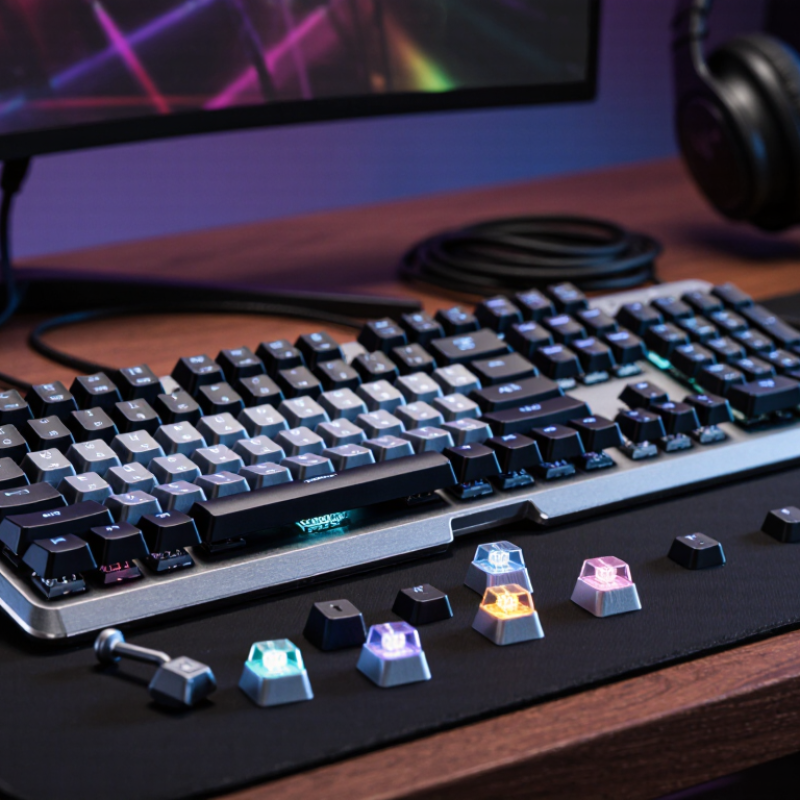
A mechanical gaming keyboard uses a separate physical switch beneath each key. Press a key and its stem moves against a spring, closing an electrical contact. That construction differs from a membrane keyboard, where keys press a shared flexible layer. The switch’s travel, actuation point, and resistance shape how a press feels and when it registers. That is the core.
Switch specifications commonly list endurance ratings around 50 million keystrokes, with some designs rated higher. These are controlled-test figures, not guarantees of real-world life. Dust, heavy impacts, and uneven use can change results. A keyboard’s electronics matter too: rollover determines how many simultaneous key presses it can register, while polling rate describes how often it reports input to the computer. Faster numbers sound impressive, but the practical difference depends on the game, system, and player.
Newzoo’s 2024 Global Games Market Report estimated 3.42 billion players worldwide, but that broad figure does not mean everyone needs a mechanical board. Switch choice is personal. A tactile bump can make each press easier to feel; a linear switch moves more smoothly. Sound varies with the switch, case, and desk surface—sometimes more than expected. Try a few switches if possible, and treat published specifications as useful clues, not a substitute for your own hands.
Why Choose a Mechanical Gaming Keyboard? - What Defines a Mechanical Gaming Keyboard?
| Feature | What Defines It | Why It Matters for Gaming | What to Consider |
| Individual key switches | Each key uses a separate mechanical switch beneath its keycap. | Switches can provide distinct, consistent-feeling key presses. | Feel and performance vary by switch design and keyboard model. |
| Switch feel | Common switch styles include linear, tactile, and clicky. | Linear switches have a smoother press; tactile switches have a noticeable bump; clicky switches add an audible click. | Choose based on preference, game type, and whether keyboard noise is suitable for your space. |
| Actuation point | The actuation point is where a key press is registered; its position depends on the switch. | It affects how far a key must travel before an input registers. | Check the specifications: actuation distance is not identical across all mechanical switches. |
| Key rollover and anti-ghosting | These features describe how a keyboard handles multiple simultaneous key presses and unintended extra inputs. | They can help register combinations such as movement keys used together with other controls. | Capabilities vary by model; these features are not exclusive to mechanical keyboards. |
| Durability | Mechanical switch lifespan is often specified as a number of keystrokes, with ratings varying by switch and model. | A stated lifespan can help estimate long-term use under the manufacturer’s test conditions. | Compare the published rating, warranty, and repair options rather than assuming every mechanical keyboard lasts the same amount of time. |
| Customization | Some models support replaceable keycaps, programmable keys, or adjustable lighting. | Customization can make controls easier to identify and adapt the keyboard to personal preferences. | These options are model-dependent; check compatibility and included software or hardware features. |
| Size and layout | Layouts range from full-size keyboards with a number pad to compact designs with fewer dedicated keys. | A smaller layout can leave more desk space for mouse movement, while a full-size layout keeps more keys readily available. | Consider the keys you use, desk space, and whether a compact layout requires key combinations for certain functions. |
How Mechanical Switches Register Keystrokes
Why Choose a Mechanical Gaming Keyboard?
How Mechanical Switches Register Keystrokes
A mechanical switch registers a keypress when its moving stem reaches the actuation point and closes an electrical contact. The keyboard’s controller scans a grid of rows and columns, identifies the pressed key, then sends a key event to the computer. A tiny movement. The exact actuation distance and force vary by switch design, so two keyboards can feel quite different even when their keys look alike. Some switches use magnetic sensing instead of metal contacts; these detect a change in the magnetic field rather than a circuit closing.
The signal still needs to travel. The USB-IF USB 2.0 specification defines 1-millisecond frames for full-speed USB, but that figure describes bus timing—not total keyboard latency. Switch movement, controller scanning, debounce filtering, and the computer’s input handling also affect when a press appears onscreen. Faster registration can help in quick games, but it is not automatically more comfortable. A very light switch may trigger when a finger merely rests on the key. That trade-off is easy to overlook.
Tips: Test a few switches if possible. Press a key slowly and notice where it activates, not just how loud it sounds. Check the manufacturer’s published actuation distance and force, then treat those figures as a guide rather than a perfect prediction of feel.
USB-IF, USB 2.0 Specification, §5.6.4.
Which Gaming Benefits Do Mechanical Keyboards Offer?
Mechanical gaming keyboards use separate switches beneath each key. Their tactile or audible feedback can help players confirm inputs without looking down. Many models also handle several simultaneous key presses reliably. That matters when movement, jumping, and shortcuts overlap during a match.
A consistent actuation point can make repeated commands feel predictable. But no keyboard makes every player faster. Switches vary, and a stiff spring may tire your fingers during long sessions. Noise matters, too.
Tips: Try the switch feel before buying, if possible. Check whether the sound suits your room, and adjust your hand position during play.
Mechanical switches are often designed for many keystrokes, but real-world lifespan depends on use and build quality. Removable keycaps can make cleaning easier when dust gathers around the switches. Still, upkeep is not magic; crumbs can be stubborn.
It is easy to focus on response speed and overlook comfort. A lighter switch may suit rapid inputs, while a heavier one can reduce accidental presses. The best choice depends on your hands, games, and tolerance for sound.
How Layouts, Keycaps, and Features Can Be Customized
A mechanical gaming keyboard is most useful when its layout fits your hands and habits. A compact layout leaves more desk space for mouse movement, while a full-size board keeps the number pad within reach. Split or angled layouts can change wrist position, but they take time to learn. Measure your desk, note which keys you actually use, and consider whether moving your hand less matters more than dedicated keys.
Keycaps affect more than appearance. Sculpted profiles can make rows easier to distinguish by touch, and textured caps can help locate movement keys without looking down. Check the keycap material and layout compatibility before buying replacements; not every set fits every board. The Entertainment Software Association’s 2024 Essential Facts report says 61% of Americans play video games, a reminder that gaming setups serve a broad range of players—not one standard hand size or play style.
Programmable keys, adjustable actuation, and removable switches offer more control. A player can assign a rarely used command to a nearby key, or choose a heavier switch to reduce accidental presses. Start with one change and test it in ordinary play. More options are not always better. Customization can become a distraction, and a carefully tuned setup may still feel wrong after a week. Keep what improves comfort or control, and undo what does not.
What Factors Matter When Choosing a Mechanical Keyboard?
Why Choose a Mechanical Gaming Keyboard?
What Factors Matter When Choosing a Mechanical Keyboard?
A mechanical gaming keyboard can offer distinct key feedback and reliable performance, but the right choice depends on how you play. Start with the switches: linear types move smoothly, while tactile ones have a noticeable bump. Clicky switches make more noise, which may bother people nearby. Try before you buy. If possible, test keys in person; descriptions rarely capture the feel accurately.
Tips: Check the layout, too. A compact keyboard saves desk space for broad mouse movements, while a full-size model keeps the number pad. Look for rollover and anti-ghosting support if you often press several keys together. Adjustable height and a comfortable wrist position matter during long sessions. A sturdy frame helps, but added weight can make the keyboard less convenient to move.
Consider connection type, keycap durability, and whether switches can be replaced. Wireless models reduce cable clutter; wired ones avoid battery checks. Neither option is automatically better. In everyday use, sound can matter more than expected, especially in a shared room. I’d compare return policies and try a few switch styles before deciding. I have found that the “best” feel can change after an hour of play, so a quick test is not always enough.
